Table cards and menu cards
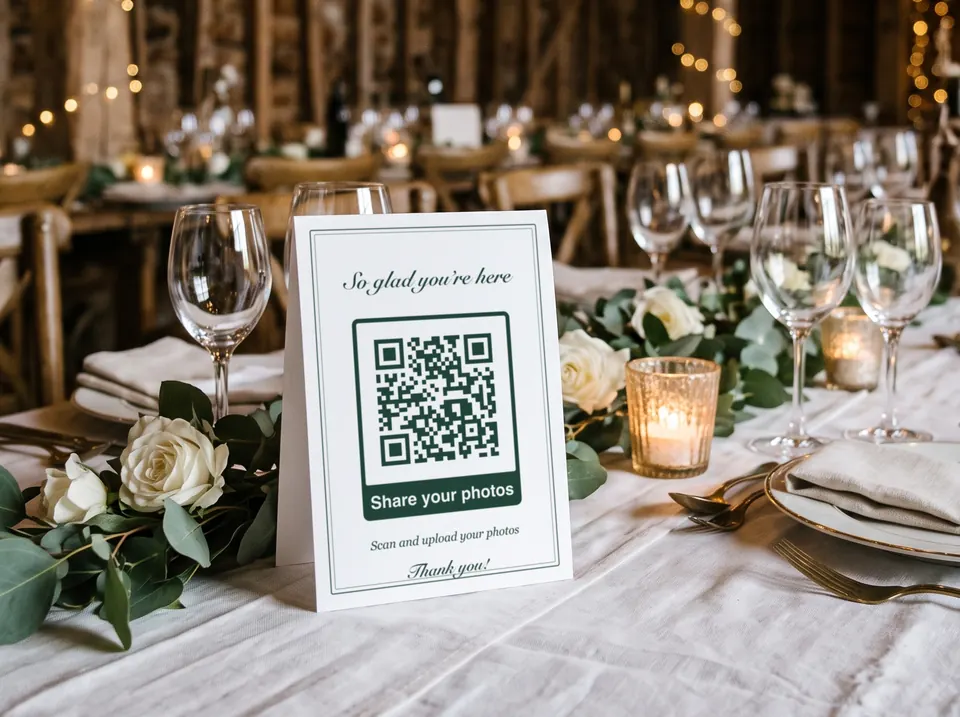
A small code at every place. Anyone who takes a lovely picture between two courses uploads it straight away, before it gets lost on their phone.
Wedding · Photos · Guests
One code on every table, and your guests’ photos end up in one place instead of in twenty chats. Plus the way to the venue on the invitation and the Wi-Fi in the hall. Free, no sign-up and in print quality for table cards, signs and invitations.
Last updated:
For the photos, paste the link to your album or upload folder. Next to it, the way to the venue and the Wi-Fi for your guests are ready too.
The link to your shared album or upload folder. If https:// is missing at the start, we add it. More on the link code
Coordinates pin the exact spot, but a plain address works too. More on the location code
Guests scan and they are online — no reading passwords out loud. More on the Wi-Fi code
Fill in at least one field on the left and your QR code appears right here.
Use SVG, PDF or EPS for print. These vector files stay sharp at any size.
PNG, JPG, SVG or WebP, up to 2 MB. The file stays on your device, it is not uploaded.
Transfer codes stay without a logo: the standard requires error correction M, and with M a logo would be too risky.
The modules under the logo are left out. Test the code with two phones before printing, especially with “Large”.
Up to 24 characters. Emojis are left out so that PDF and EPS show the same text as the preview.
Higher levels survive scratches and logos but make the pattern denser.
For transfer codes the standard requires level M.
The light border is part of the code. Below 4 modules you are asking for trouble.
Advertisement
How it works
A shared album or a folder guests may upload to, with a service you already use. From there, copy the link for sharing.
Paste the link, choose the frame with “Share your photos” and match the colours to your invitations and table cards. For print, download it as PDF or SVG.
Scan it, upload a test picture and check that it arrives. Do this on a phone where you are not signed in. Only then do the table cards go to print.
Uses
A small code at every place. Anyone who takes a lovely picture between two courses uploads it straight away, before it gets lost on their phone.
A sign next to the guest book or the photo booth: “Share your photos with us”. Printed large enough, guests scan it as they walk past.
A location code opens the maps app with the venue as the destination, so nobody has to type in the address. A link code leads to the wedding website with the schedule and the RSVP.
In the countryside, mobile reception is often weak. If the venue offers Wi-Fi for guests, a Wi-Fi code at the entrance helps, and the photos upload faster.
After the celebration, the link to the finished album goes on the thank-you card. That way, guests who did not take any pictures themselves get to see them too.
The same on a smaller scale: a folder for the evening’s pictures, a code on the drinks sign or in the group chat.
Where the code leads
The code only contains a link. Where it leads is up to you, and that is the most important decision: it sets what guests see and what they have to do for it.
Anyone who scans the code, or only has a photo of the table card, gets the link. For private pictures, an upload folder is therefore the more cautious choice: guests see nothing, and you share the finished album later with the people you choose. Ask your guests before you show pictures of them publicly.
In practice
A hundred guests with ten photos each in full resolution quickly add up to several gigabytes, and many times that with videos. Check beforehand that there is enough storage. A full folder accepts nothing more, and you only notice after the celebration.
At the table, people scan from about 30 cm. A typical upload link needs about 4 cm side length for that, a good 5 cm with a logo. A sign scanned from one metre away should be 13 cm or more.
Gold on cream looks elegant but scans poorly: the modules need clear contrast with the background. Dark green, midnight blue or burgundy on light paper work well. The preview warns you if the contrast is not enough.
Write under the code what happens, such as “Scan and share your photos with us”. If no account is needed, feel free to say so. People who know what to expect are more likely to scan, especially older relatives.
Good to know
The size calculator in the guide gives the right side length for every reading distance, from the table card to the sign at the entrance.
To the size calculatorThe phone’s camera is enough for scanning. Whether guests need an app or an account to upload depends on where the link leads. With a Dropbox file request or a Nextcloud upload-only link, it works in the browser, without an account of their own.
One you already use and that has enough free storage. For collecting photos without an account for guests, a Dropbox file request or an upload-only link in Nextcloud works well. If everyone should see every picture, use a shared album, for example in Google Photos.
No, a code leads to exactly one destination. You make three codes; the generator above has Link, Address and Wi-Fi side by side for this. Or you link to a wedding website that has everything on it.
For a typical upload link read from 30 cm away, about 4 cm side length, a good 5 cm with a logo, each plus a light border all around. The shorter the link, the coarser the pattern and the smaller the code can be.
No. The code is static and does not depend on our server. It works as long as your album or folder exists. So guests can still find the pictures years later via the thank-you card.
Anyone who scans the code or has a photo of it gets the link. With an upload folder there is nothing to see there, people can only upload. With a shared album, anyone with the link sees every picture. Choose according to how private the photos should stay.
With a location code on the invitation: it opens the maps app with the venue as the destination. In the generator above it is called “Address”. With coordinates it also finds an estate or a cabin without a house number.