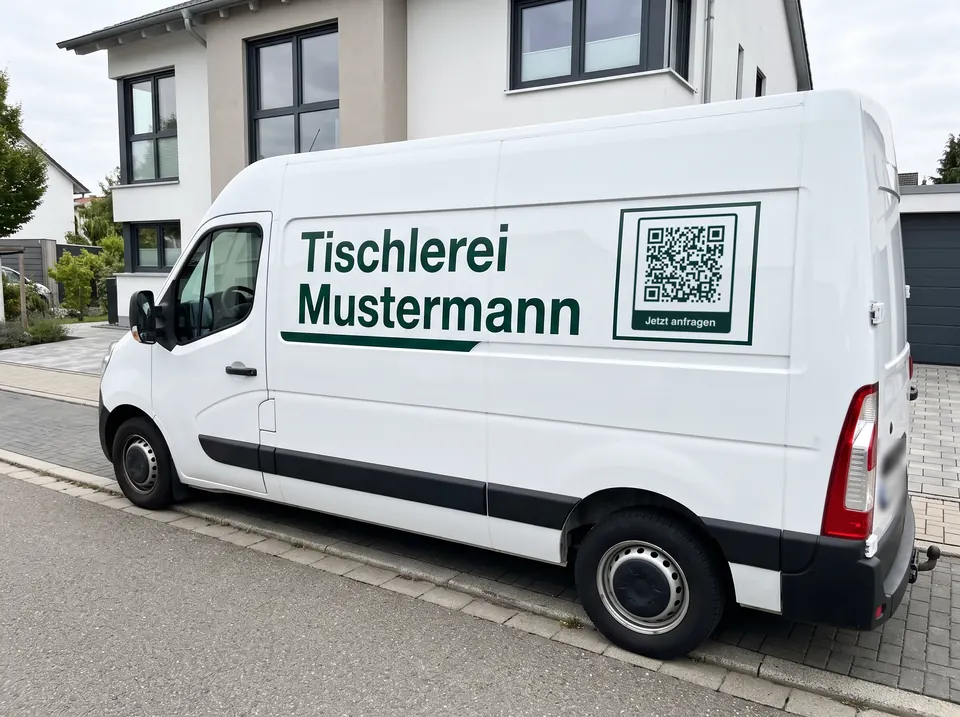
The van at the customer’s
While you are working in the kitchen, the van is parked in the drive. Neighbours who happen to be looking for a tradesperson themselves scan it as they walk past.
Van · Company car · Vehicle graphics
Your van stands outside your customers’ homes every day, and the neighbours see it. A QR code on the lettering takes them to your website, your number or your contact details, with no typing. Free, no sign-up and as a vector file for your sign maker.
Last updated:
Link, contact card or phone call: choose what should happen when someone scans it. Frame, logo and colours are ready just below.
Ideally a short path on your own domain, such as example.com/van. You can redirect it later without replacing the vinyl. More on the link code
Stored as a vCard — phones turn it straight into a contact. More on the vCard
Starts a call to the number you entered.
Fill in at least one field on the left and your QR code appears right here.
Use SVG, PDF or EPS for print. These vector files stay sharp at any size.
PNG, JPG, SVG or WebP, up to 2 MB. The file stays on your device, it is not uploaded.
Transfer codes stay without a logo: the standard requires error correction M, and with M a logo would be too risky.
The modules under the logo are left out. Test the code with two phones before printing, especially with “Large”.
Up to 24 characters. Emojis are left out so that PDF and EPS show the same text as the preview.
Higher levels survive scratches and logos but make the pattern denser.
For transfer codes the standard requires level M.
The light border is part of the code. Below 4 modules you are asking for trouble.
Advertisement
How it works
A link to your website or enquiry form, a contact card that saves itself on the phone, or a code that dials your number straight away. One code leads to exactly one destination.
A frame with “Get a quote”, your logo in the centre, the colour of your lettering. With a logo, error correction switches to the highest level by itself.
As SVG, PDF or EPS: vector files stay sharp at any size. Before the vinyl goes on, hold a full-size test print against the vehicle and scan it from a few metres away.
Uses
While you are working in the kitchen, the van is parked in the drive. Neighbours who happen to be looking for a tradesperson themselves scan it as they walk past.
In the car park at the DIY store or outside the supermarket, people often stand a few metres behind the vehicle. There, a slightly smaller code than on the side is enough.
Many businesses are looking for staff. A code with “We’re hiring” leads to your jobs page, and whoever scans it already knows your business by sight.
On a home care service’s company car, relatives find the contact details without writing down the number. With a contact card in the code, it goes straight into the address book.
The code leads to the opening hours, the order page or this week’s offers. Anyone who sees the van at the market orders directly next time.
Whatever stands at the building site for days advertises the longest. A code on the side of the trailer says who is building here and how to reach you.
What the code contains
The generator above offers three types to choose from. Which one fits depends on what the person scanning should do next:
In Germany, drivers may not hold their phone to scan, not even at a red light (§ 23 (1a) StVO); similar rules apply in many countries. The code on the vehicle is meant for pedestrians, passengers and the car park. Plan its size and position for them, not for oncoming traffic.
In practice
A link with your company domain and a short path usually gives 29 modules. Scanned from 2 metres, it needs a side length of just over 23 cm, from 3 metres just under 35 cm, and with a logo 30 and 44 cm. Add the light border all around.
Don’t apply it over body creases, door gaps, handles or tight curves, or the pattern will be bent out of shape. On a dark vehicle, the code needs a light area: dark modules on a light background, never the other way round.
A path such as example.com/van that your website redirects keeps the code coarse. If the destination changes, you only change the redirect. And if the redirect adds campaign parameters, your analytics show how many people come via the vehicle.
Print the code at full size, hold it against the vehicle and scan it from the planned distance, with an older phone and against the light too. Only then does the file go off for the vinyl.
Good to know
The size calculator in the guide gives the right side length for every reading distance, from the business card to the side of a van.
To the size calculatorThat depends on the reading distance. A typical link with 29 modules needs a side length of just over 23 cm from 2 metres, and just under 35 cm from 3 metres. On the side panel, 30 to 40 cm is common; on the rear door, 20 to 30 cm is often enough. The size calculator in the guide gives you the value for your distance.
Not as the driver: in Germany, picking up your phone while driving is forbidden, even at a red light, and similar rules apply in many countries. Passengers and pedestrians can scan. That is why the code is mainly meant for the parked vehicle: at the customer’s, in the car park, at the building site.
A vector file: SVG, PDF or EPS. It stays sharp at any size, and the sign maker can print it or cut it from vinyl. A PNG suits websites and social media; for vinyl at 40 cm it is the poorer choice.
The code is static: it always leads to the address it contained when it was created. That is why a short path of your own such as example.com/van, which your website redirects, is worth it. If the destination changes, you only change the redirect, and the vinyl stays.
Yes, with a light area underneath. Scanners expect dark modules on a light background. A light code directly on dark paint is inverted, and some camera apps can’t read it. The preview in the generator warns you about this.
For most businesses, a link: the website shows your work, reviews and contact details all at once. The contact card suits you if customers mainly ring you. The phone code suits an emergency call-out service, where it has to be quick.
We don’t count anything, as the code doesn’t go through our server. You can count it yourself: let the code point to a path of your own that your website redirects with campaign parameters. Your analytics then show how many visits come from the vehicle.